
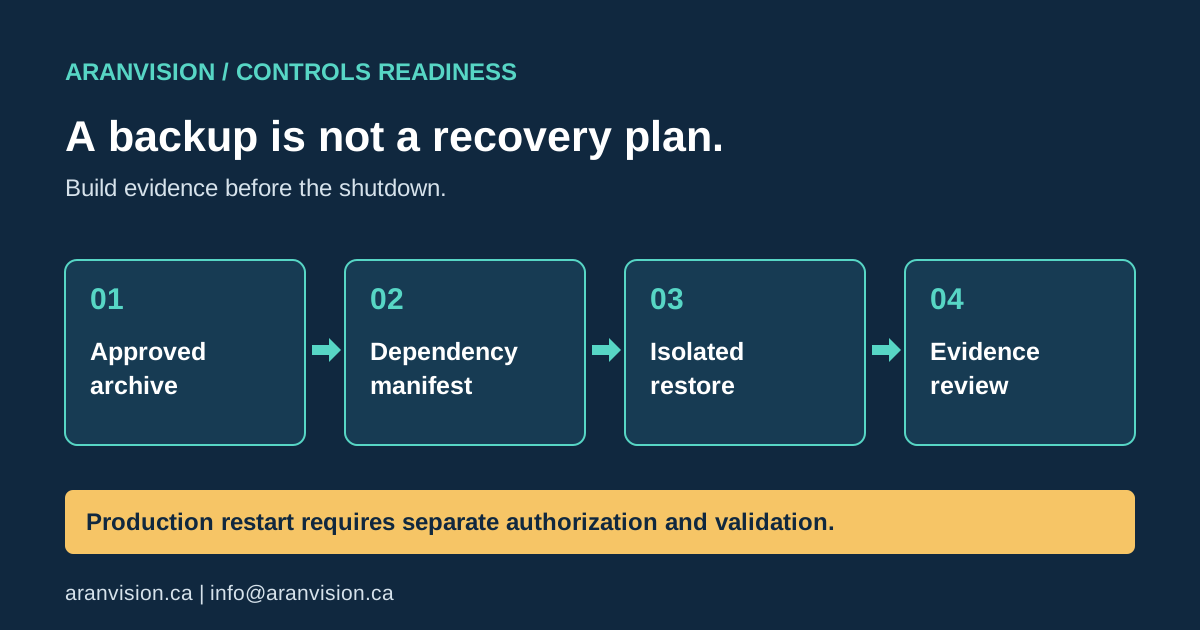
A project file can be present, recent and readable yet still be insufficient to recover an industrial machine. The engineering workstation may lack the right software version. A replacement controller may have different firmware. An HMI runtime may depend on a separate application, licence or communication configuration. These gaps often remain invisible until the original equipment or workstation is unavailable.
For an Ontario manufacturer preparing a shutdown or controls modernization, the useful question is not simply whether someone copied a file. It is whether an authorized team can use a defined recovery package to reach a documented, safe acceptance state. This guide proposes a practical structure for that review. It is not an instruction to download logic, change firmware or test outputs on operating machinery.
Start with the recovery outcome
Name the asset and the failure scenario before collecting files. Recovering an engineering workstation is different from replacing a failed controller, restoring an operator terminal or rebuilding a historian. Each scenario has different dependencies and operational consequences.
Write a recovery objective that can be tested without promising an unrealistic restart time. For example: an authorized controls specialist can open the approved PLC and HMI projects on the designated recovery workstation, identify the intended hardware and firmware, and explain the remaining commissioning checks. That proves preparation. It does not prove that a production line can safely restart within the same time.
Ask operations to identify which functions must return first and which can remain unavailable temporarily. Record the responsible person, the required operating state and the point at which a recovery attempt must stop for review.
Inventory dependencies, not just project extensions
Create one recovery manifest per machine or system. Include the controller and terminal identities, project revision, software version, firmware requirements, device descriptions and relevant network configuration. Record how the approved files were obtained and who confirmed that they represent the intended installation.
Separate application files from supporting material. Drive parameter exports, communication mappings, recipes, scripts, alarm definitions, drawings and commissioning records may be needed to interpret or verify the application. Do not assume that an upload from a device recreates every original engineering artifact; confirm the behaviour for the specific product and version.
List dependencies that cannot simply be copied, such as licences, managed credentials and replacement hardware. Store secrets through the approved secure process, not in a broadly shared project folder. A manifest should identify the authorized retrieval method and owner without exposing the secret itself.
Establish which revision is trustworthy
The newest filename is not necessarily the approved baseline. An engineer may have saved an unfinished change after the last accepted commissioning test. Conversely, the running system may contain an approved modification that never reached the shared archive.
Reconcile the project record with the change register and available acceptance evidence. If a comparison with the installed system is needed, plan it as an authorized activity with product-specific instructions and appropriate access. Keep a distinction between observed differences, suspected causes and approved corrections.
Record a checksum for each archived file so later copies can be compared. A matching checksum shows that bytes have not changed relative to that reference. It does not prove that the original application was correct, safe or free of malicious changes. Trust in the baseline also depends on provenance and review.
Keep the first restore isolated
Use a controlled workstation, virtual environment or suitable spare hardware that is separated from production communication paths. Confirm the isolation before opening software that might reconnect automatically to remembered device addresses.
Start with non-operational checks: retrieve the archive, verify integrity, confirm authorized access, open the projects and examine their dependencies. Record missing libraries, incompatible versions, unavailable licences and unresolved device definitions as findings. Do not dismiss an error merely because a different machine opens the file.
If hardware testing is justified, define a separate procedure for that exact platform. Prevent unintended energization and connections to operating equipment. Only qualified and authorized personnel should perform tests involving powered circuits, motion, interlocks or safety functions. An isolated software check never substitutes for required functional or safety validation.
Use a recovery evidence checklist
For each row below, record a result, the evidence location, an owner and any unresolved condition. Avoid a single overall pass that hides partial failures.
This checklist is a scoping tool. Add platform-specific requirements and site procedures rather than treating it as a universal vendor recovery sequence.
- Retrieval: Can an authorized second person locate the approved archive without relying on the original engineer's laptop?
- Integrity: Does the retrieved copy match the recorded checksum and intended revision?
- Access: Can the designated recovery role obtain the required licences and credentials through the approved process?
- Compatibility: Do the specified engineering tools open the files with known, reviewed dependencies?
- Configuration: Are controller, HMI, drive and network identities documented sufficiently to avoid selecting the wrong target?
- Verification: Are expected behaviours and outstanding commissioning checks described clearly?
- Rollback: Is there an approved stopping point and a method for returning to the previous accepted state if a later change fails?
- Handover: Can someone other than the preparer follow the record and identify what remains unproven?
Measure elapsed work honestly
Time the parts actually exercised: locating files, obtaining authorized access, preparing the workstation, opening applications and resolving dependencies. Record waiting time separately from technical work. A licence retrieval delay may dominate the recovery even when the project opens immediately.
Do not label a desktop exercise as a complete recovery-time achievement. State the tested environment, personnel, assumptions and exclusions. If spare hardware, field verification or operational release was not included, make that visible. This helps the next shutdown plan reserve realistic time for the remaining work.
Connect backups to change control
After an accepted controls change, identify which recovery artifacts must be refreshed. Assign the update to a named role and require evidence that the new package is retrievable. Keep the previous accepted state according to the site's retention policy instead of overwriting it casually.
Review the package when software, hardware, access arrangements or support ownership changes. Schedule recovery exercises based on the operational risk and the site's procedures. The exercise should also test the process for reporting and correcting gaps, not only the storage system.
NIST's June 2026 announcement of its OT Backup Quick Start Guide emphasizes regular backups, testing and integration with change management and recovery exercises. Those principles support the planning approach here; they do not certify a particular recovery package or guarantee a safe restart. NIST source.
Copyable recovery-readiness worksheet
Record asset, location, failure scenario, review date, approved baseline and review owner. For every check below, record pass, gap or not tested, an evidence reference, and an owner with an action due date.
Complete the record with measured exercise duration, waiting time, exclusions and next actions. This worksheet does not authorize connection, download, firmware change or energized testing on operating equipment. It is an independent planning template, not a vendor restore procedure.
- A second authorized person retrieves the approved archive.
- File checksum matches the recorded baseline.
- Software, firmware, hardware and libraries are identified.
- Licence and credential retrieval routes work without exposing secrets.
- Production isolation is confirmed before opening engineering tools.
- PLC and HMI projects open in the specified recovery environment.
- Missing source, recipes, mappings and drive settings are recorded.
- Expected behaviours and remaining hardware/field tests are defined.
- Stop conditions, rollback owner and acceptance authority are identified.
- A second reviewer can follow the evidence and unresolved actions.
Turn the findings into a defined work package
A useful review ends with bounded actions: recover a missing HMI source, document a software dependency, reconcile a drawing or arrange an isolated test. Separate documentation work from changes that require operational authorization, specialist licensing or safety validation.
AranVision can help scope controls documentation and recovery-readiness reviews. Start with the asset list, known gaps and available approved records—do not send passwords or unrestricted production access. Explore controls modernization, consulting, training or discuss a defined review.
Frequently asked questions
Does opening a PLC file prove the machine is recoverable?
No. It verifies one dependency. Hardware, runtime configuration, access and operational acceptance remain separate checks.
Should the test overwrite the running controller?
Not as a default readiness exercise. Begin isolated; any production change needs a separately approved procedure and rollback plan.
Is this a certification?
No. It is an evidence-led planning checklist. Manufacturer instructions, site controls and applicable professional responsibilities still govern the actual work.
Official and reference sources
The links below support the source facts discussed in this guide. Product claims and event details remain the responsibility of the referenced publisher; confirm current information at the source.
Use the guide inside an approved work process
This guide supports planning and technical review; it does not authorize a change to live equipment. Before applying it, identify the system owner, production boundary, electrical and machine hazards, required permits, current backups and the person authorized to approve testing. Keep confirmed evidence separate from assumptions, and record any temporary simulation, force, inhibit or workaround under the site’s approved method.
If the installed condition does not match the available drawings or software, preserve the discrepancy and resolve ownership before downloading, energizing or bypassing a protective function. Final acceptance should reference the actual as-left configuration, executed test evidence, open actions and responsible approver.
Planning a related controls project?