Optional Google Analytics and Google Ads measurement use advertising identifiers to measure site use and successful enquiries. Enquiry details are not included; personalized ads and enhanced conversions stay off. You can reject cookies and still enquire. Read our privacy notice.
Work that can be reviewed, tested and handed over.
Effective operator interfaces reduce ambiguity. AranVision develops and improves screens around the decisions operators need to make, the faults maintenance teams need to isolate and the information engineering teams need to review.
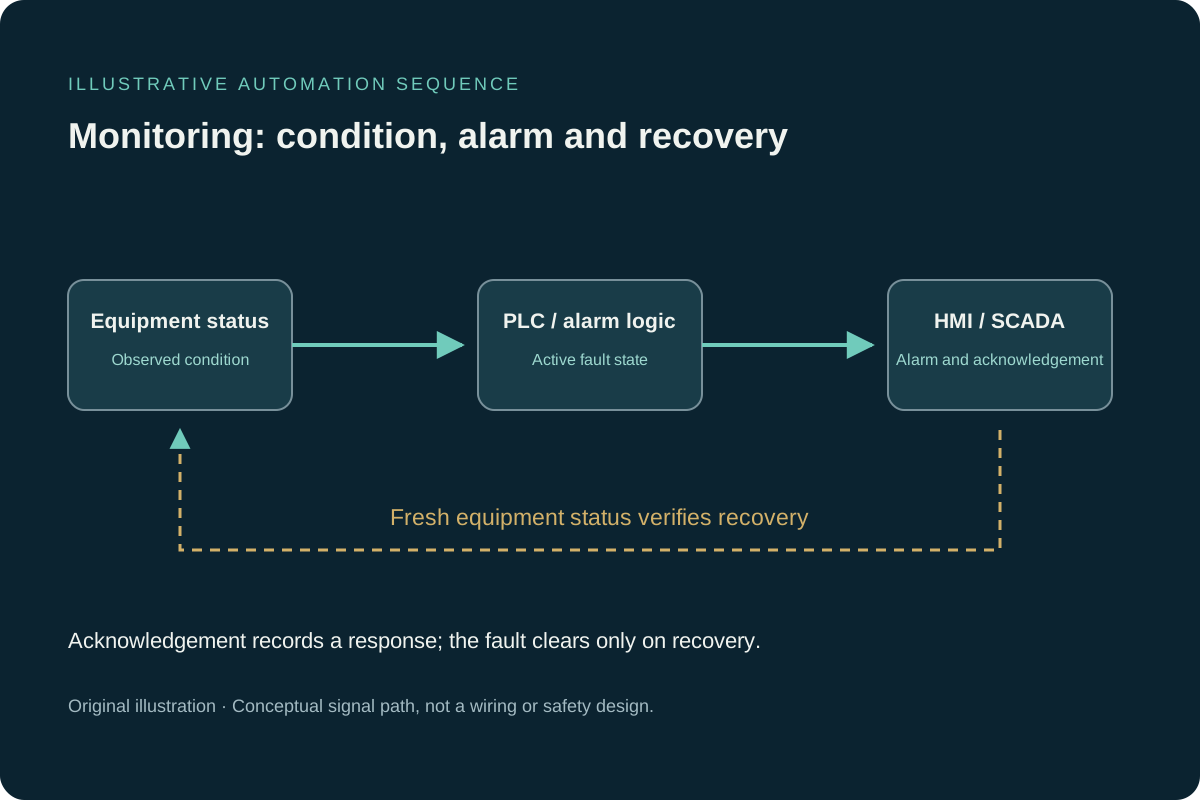
A simulated equipment fault raises an HMI / SCADA alarm. Acknowledgement does not clear the alarm until the equipment returns to a healthy state.
Equipment: healthy · Alarm: clear
1 Equipment running
2 Equipment alarm
3 Alarm displayed
4 Operator acknowledgement
5 Recovery confirmed
View the control-signal diagramOriginal illustration. Conceptual signal path; a command is not confirmed feedback. Not a wiring or safety design.
Synthetic demonstration, not connected to plant equipment. Each 15-second cycle restarts the example. Operator acknowledgement is simulated automatically in this example. Acknowledging an alarm does not resolve an active fault; equipment recovery is verified separately.
Scope clarity
What a useful work package needs to establish.
An operator interface should communicate plant state without requiring the user to interpret software internals. The design starts with tasks: starting equipment, responding to deviations, isolating a failed permissive and confirming recovery. Navigation, colour, symbols and faceplates are then applied consistently so the same condition has the same meaning throughout the application.
Tag quality and control ownership are verified at the interface boundary. A polished screen cannot compensate for stale data, ambiguous PLC logic or an alarm that does not identify the affected equipment and required response. Testing therefore includes commands, feedback, security, communication loss, alarm history, trends and restart behaviour.
Every engagement begins with a written boundary for access, production impact, client-supplied information, approvals and third-party responsibilities. Recommendations are tied to the evidence available at the time. If field discovery changes a critical assumption, the effect on scope, testing and acceptance is reviewed before the work proceeds.
Project readiness
Fit, inputs and acceptance before work starts.
These checkpoints keep responsibilities visible and prevent important interfaces from becoming late-stage surprises.
01
Best-fit assignments
An HMI with unclear navigation, nuisance alarms or weak maintenance diagnostics
A SCADA or BAS extension that must integrate with existing PLC tags and operating standards
A defined modernization package where screens, alarms and trends need coordinated verification
02
Inputs to provide
Current application backup, screen standards, tag database and user roles
PLC interface ownership, alarm philosophy and historian requirements
Operator workflows, bad-quality behaviour and change-control expectations
03
Acceptance evidence
Verified commands, feedback, interlocks and bad-quality states
Reviewed alarm priority, message, acknowledgement and recovery behaviour
Versioned application backup, tag changes and operator handover record
Project outcomes
What the engagement is designed to improve.
Consistent navigation and equipment status
Actionable alarm messages and priorities
Useful trends for diagnosis and process review
Clear separation of commands, status and permissives
Scope boundary
Programming, controls documentation, integration, testing and commissioning support are delivered within the agreed responsibility matrix. Any regulated professional engineering, electrical contracting, panel certification or authority approval is identified separately and assigned to the appropriately licensed or authorized party.
Typical deliverables
A defined package with clear technical outputs.
The final scope is adjusted to the installed system, project stage, client standards and site responsibilities.
01
HMI and SCADA screen development
02
Alarm rationalization support
03
Tag, communication and device mapping
04
Trend and diagnostic views
05
Data-point list with units, timestamps and signal-quality handling
06
Agreed history or export records with checks against the source values
07
User-access and change-control considerations
08
FAT, SAT and handover records
Delivery method
Three decisions that keep controls work under control.
01
Map operator decisions
Identify the process states, deviations and actions that each screen must communicate.
02
Standardize the interface
Use repeatable symbols, colours, navigation and alarm behaviour across the application.
03
Test with the control system
Verify commands, feedback, bad-quality states, alarms, trends and communication-loss behaviour.
Common questions
Questions to settle before kickoff.
Can you improve an existing HMI without replacing the PLC?+
Yes. Screen hierarchy, diagnostics, alarms and trends can often be improved while preserving the installed control platform.
Do you support BAS and facility controls?+
Yes. Support can include HVAC and utility controls, alarm investigation, field-device diagnostics, modernization planning and commissioning.